

You can start streaming a DJ set right now with a phone or laptop, a simple audio interface, and a streaming app, but the real priority is picking a copyright-safe platform or a cleared catalog before you hit go. Run a short unlisted or dummy stream first to catch audio issues and copyright claims. Get that right and the gear part is the easy half.
TL;DR:
- Twitch’s cleared catalog lowers takedown risk, but its tracks cannot appear in VODs or clips; Mixcloud Live offers licensing with weaker discovery.
- A standard ASCAP or BMI public performance license generally does not cover global livestreams or archived recordings, so it cannot replace platform specific clearance.
- Route music and microphone audio through one interface, match sample rates across DJ software and OBS, and monitor through headphones to prevent drift and distortion.
- Use no more than half your upload bandwidth for the stream, leaving headroom for fluctuations; lower resolution to 720p if the connection falters.
Table of Contents
- Choosing your hardware: phones, laptops, interfaces, and cameras
- Software and routing: getting your mix into the stream cleanly
- Picking a platform and understanding copyright risk
- Encoder, bitrate, and network settings that keep a stream stable
- Pre-show checklist and running the live set without a hitch
- How we run live DJ shows
- What actually separates a good DJ stream from a forgettable one
- Where Hot Mic Radio fits into your DJ streaming plans
- FAQ
- Sources
Choosing your hardware: phones, laptops, interfaces, and cameras
A phone gets you live fastest. It has a built-in camera, handles basic apps without configuration, and works fine for a quick back-of-the-booth stream or a casual mix from your bedroom setup. A laptop or desktop opens up more control: multiple camera angles, OBS Studio for scene switching, and the ability to layer graphics or overlays that make a stream feel like a real show. If you’re serious about building an audience, start on a computer. If you just want to test the waters, your phone works tonight.
Whatever device you choose, your audio interface is the piece that actually makes or breaks the stream. You need enough inputs to carry your mixer or controller output plus a microphone, and you want a passthrough or “thru” connection so you can still send sound to your booth monitors or speakers while the same signal feeds your stream. Match your interface’s sample rate to your streaming software’s settings; a mismatch is one of the most common causes of crackling or distorted audio in a first stream.
Controller outputs matter too. Route your master output into the interface, and if your controller has a dedicated booth or cue output, use it to monitor your mix independently from what viewers hear, so you can cue up the next track without broadcasting it. For talkovers and shoutouts, a simple XLR or USB microphone routed into a spare input on your interface keeps your voice clear and separate from your music bed.
Camera and lighting don’t need to be complicated:
- A single ring light or a cheap softbox pointed at your face removes harsh shadows instantly.
- Position your camera at eye level, not looking down from above, for a more natural viewer connection.
- Keep your background simple so attention stays on the mix, not the clutter behind you.
Software and routing: getting your mix into the stream cleanly
OBS Studio has become the standard free encoder for a reason: it’s open source, handles scene switching, overlays, and multiple audio sources, and integrates with every major streaming platform. If you’re mixing with Serato, Rekordbox, or another DJ program, you need a way to route that software’s audio output into OBS without routing through your laptop speakers first.
- On a Mac, use a virtual audio driver like BlackHole to send your DJ software’s output directly into OBS.
- On Windows, Voicemeeter or similar virtual cable tools do the same job.
- Set your DJ software’s master output to the virtual device, then add that same device as an audio input source inside OBS.
- Add your microphone as a separate audio source so you can control mic and music volume independently.
If you’re streaming from a phone, most platform apps let you go live directly, and some let you plug in an RTMP key to stream from dedicated hardware encoders instead. For a single-machine setup, run your DJ software and OBS on the same laptop for simplicity. A dedicated streaming machine (a second laptop just for OBS) avoids CPU strain during long sets but adds setup complexity that most beginners don’t need yet.
Pro Tip: Route every audio source, music and mic, through one interface rather than mixing separate device clocks; it keeps your audio and video locked together over a long set instead of slowly drifting apart.
Before you go live, check your levels in OBS’s audio mixer, confirm your sample rate matches across DJ software and OBS, and listen through headphones to catch any delay between what you hear and what’s recording.
Picking a platform and understanding copyright risk
Platform choice is really a copyright decision wearing a technical hat. The Twitch DJ Program gives participating DJs a searchable catalog of pre-cleared tracks, which meaningfully lowers takedown risk compared to streaming random music. The trade-off: you can’t create VODs or clips containing catalog tracks, and the catalog changes over time, so checking it regularly before a show matters.
Mixcloud Live takes a different approach entirely, operating as a fully licensed platform built specifically for DJ mixes. That licensing removes the copyright anxiety almost completely, but it comes at a cost: no VOD recordings in the same way, and weaker social discovery outside dedicated DJ and electronic music communities.
YouTube Live sits closer to Twitch in risk profile. Its content detection system scans audio against a massive rights database, and a flagged track can trigger a claim, a muted archive, or in repeat cases a strike against your channel. The safest workaround is running a dummy or unlisted stream first to see what gets flagged before you ever go live for real, a method that industry guides recommend specifically for this reason.
Here’s the part a lot of DJs miss:
- A standard PRO license from ASCAP or BMI covers public performance in specific contexts, but it typically doesn’t extend to the global, on-demand nature of a livestream or its archived recording.
- Relying on a PRO license alone for a livestream leaves you exposed in ways a platform-specific DJ program or a licensed service like Mixcloud Live does not.
- The decision rule is straightforward: pick Twitch or YouTube when discovery and audience growth matter most to you, and pick Mixcloud Live when legal certainty matters more than reach.
Live streaming overall commands a substantial global audience, which is exactly why platform choice and copyright management carry real stakes for a DJ trying to build a following through consistent streaming reach.
Encoder, bitrate, and network settings that keep a stream stable
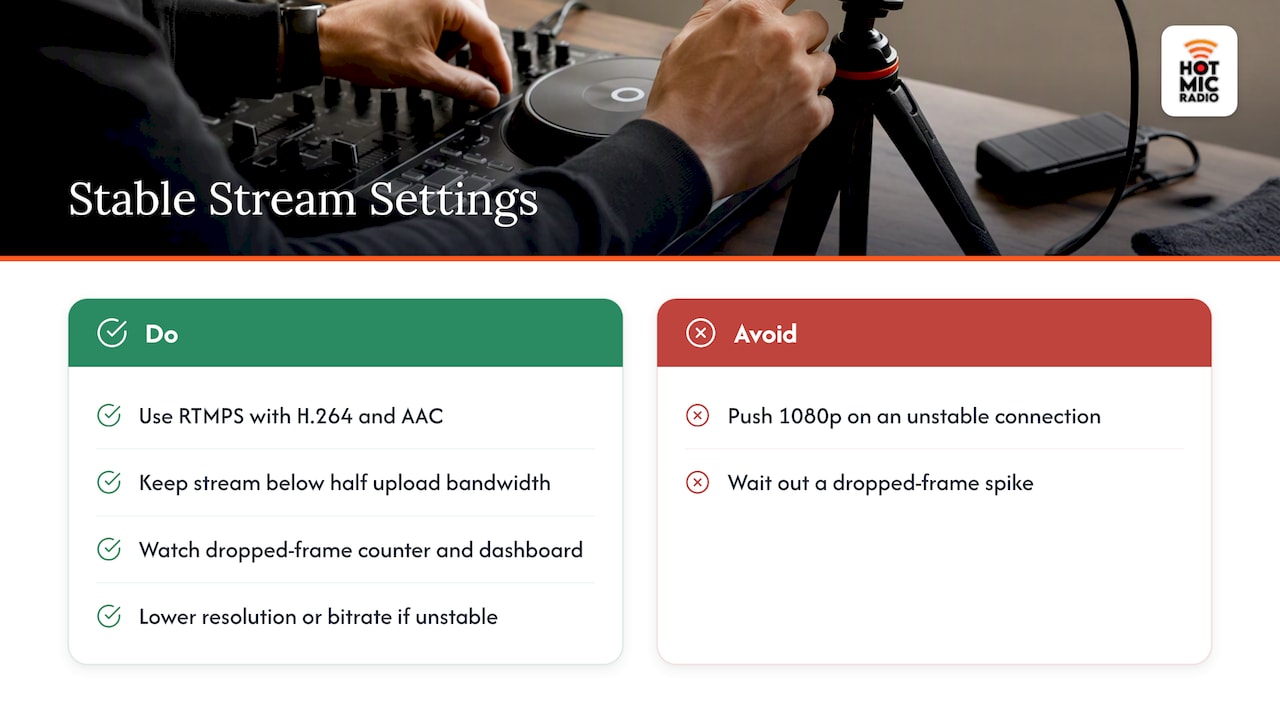
Your stream is only as reliable as the weakest link between your encoder and the platform’s servers, so get these settings right before showtime. YouTube’s own encoder guidance recommends streaming over RTMPS with H.264 video and AAC audio for the broadest compatibility, paired with a constant bitrate (CBR) and a keyframe every two seconds. Recommended bitrate ranges vary by resolution and frame rate, with typical values for 720p at 30 fps being in a moderate range suitable for most connections, and 1080p at 30 or 60 fps requiring progressively more bandwidth. These recommendations come directly from YouTube’s live encoder recommendations, and they’re a solid baseline for Twitch and Mixcloud Live as well since the underlying codec math doesn’t change much platform to platform.
Before you ever go live, run an upload speed test and aim to use no more than half of your available upload bandwidth for your stream; that headroom absorbs the network fluctuations that cause buffering or dropped frames. If your connection is unstable, scale down to 720p and a lower bitrate rather than pushing 1080p and risking a stream that stutters for your whole audience.
During the show, keep an eye on your streaming software’s dropped-frame counter and your platform’s live dashboard. A sudden spike in dropped frames usually means your upload can’t keep pace, and the fix is almost always to drop resolution or bitrate on the fly rather than waiting it out.
Pre-show checklist and running the live set without a hitch
A dummy or unlisted stream is the single most useful habit you can build. Run one a day before your real show using the exact tracks you plan to play, and you’ll surface copyright claims and audio glitches while nobody’s watching.
- Confirm audio and video sync by clapping once on camera and checking the delay in your recording.
- Rehearse your camera angles and scene switches so transitions feel intentional instead of fumbled.
- Cue your talkover moments and shoutouts in advance so you’re not scrambling mid-mix to find the mic fader.
- Assign someone, or set aside your own attention, to monitor chat so you can read the room and work in requests.
- Know your platform’s process for a takedown notice or strike before it happens, not after.
For long sets, periodically glance at your sync check since audio-video drift tends to creep in gradually over a two or three hour broadcast, not all at once. If your platform doesn’t allow VOD recordings (Mixcloud Live being the clearest example), run a separate local recording through your streaming software so you still walk away with an archive of the set for your own promotion later.
How we run live DJ shows
Running a live DJ set taught us that preparation beats improvisation every time. Our shows work off cue sheets and a loose track rundown, not a rigid script, which keeps the energy natural while making sure transitions and talkovers land where they should.
A few habits to lean on for every live show:
- Build in moments for shoutouts and listener requests rather than treating the mix as a closed set.
- Themed segments give structure to a show and give the audience a reason to tune in at a specific time.
- Route all program audio through a single board to avoid the sync drift that creeps into long broadcasts.
- Backup plans for internet drops and audio routing matter more than any single piece of gear.
If you want a sense of how that structure plays out in practice, our shows archive has examples across different formats and tempos.
What actually separates a good DJ stream from a forgettable one
Most beginner advice leans hard on gear, the right interface, the right camera, the right lighting rig, and treats copyright as an afterthought you’ll “figure out later.” That’s backward. The DJs who build a lasting audience are the ones who picked a platform strategy on day one and never had a show pulled, muted, or struck for playing music they had every right to play live but not to archive.
The overrated piece of this whole process is production polish. A clean mix and a reliable connection beat a fancy multi-camera setup with a flaky stream every single time. Viewers forgive a static camera angle; they don’t forgive buffering or a stream that vanishes mid-set.
If you take one thing from everything above, make it this: test your copyright exposure with a dummy stream before your first real show, not during it, to understand the complexities of background music rights for short video creators. Everything else, the lighting, the overlays, the camera switches, can be improved after you’ve built an audience. A strike or a pulled stream on week one is much harder to recover from.
— Hot Mic Radio Team
Where Hot Mic Radio fits into your DJ streaming plans
Once your streaming setup is solid, the next step is getting your sound in front of people who are already listening for exactly what you play. We curate Hip-Hop, R&B, Afrobeats, and dancehall programming built around live DJ shows, and we’re always looking for mixes and talent that fit that lane.
If you’ve got a 120 minute mix ready, our DJ mix submission guide walks through what we look for and how to send it over. Advertisers and sponsors looking to reach our audience can find details on our advertising page.
Ready to get your mix in rotation? Head over to our mix submission page and send us your set.
FAQ
What is the best platform to live stream DJ sets?
The right platform depends on your priority: the Twitch DJ Program and YouTube Live offer strong discovery but require careful copyright management, while Mixcloud Live offers full licensing with less discovery reach outside DJ communities. Most beginners start with a dummy stream on their chosen platform to confirm which tracks are safe before committing to a real show.
What is the rule of 32 in DJing?
This isn’t a term covered by platform terms, encoder guides, or the sourcing behind this article, so we won’t invent a definition here. If you’ve seen it referenced elsewhere, treat it as a mixing or beatmatching convention rather than a streaming or copyright rule.
Are DJ sets on Spotify?
Spotify is built around on-demand streaming of individually licensed tracks rather than live DJ broadcasts, so it isn’t a platform for streaming a live mix the way Twitch, YouTube Live, or Mixcloud Live are. DJs typically use those dedicated live-streaming platforms instead, then separately release edited studio mixes where licensing allows.
Where can I find music for DJ sets?
For livestreaming specifically, your safest sources are a platform’s own cleared catalog, like the one built into the Twitch DJ Program, or a licensed service such as Mixcloud Live. Independent and emerging artist tracks are another strong option, and submitting your own mix for airplay consideration is one way to build a relationship with outlets that showcase new music.
Sources
- DJ Program terms
- Choose live encoder settings, bitrates, and resolutions – YouTube Help
- The ultimate guide to DJ livestreaming
- Live-streaming global reach statistics – Statista